Brainstack · team memory for AI

Your team’s memory, inside the AI you already use.

Save finished work from Claude, ChatGPT or Copilot into a brain for your team or client, and anyone in it can ask for it later. Hosted by us or on your own server.

Why teams use it

Figure it out once. Your whole team knows how.

Every team has steps that live in someone's head: how the monthly report gets built, why a number was chosen, what a client always asks. Brainstack saves them when you say “save this” in the AI you already use, so the next person who gets that ask can handle it.

  • Client context“What Harbor asked for in the renewal”
  • How reports and decks get built“How we build the monthly scorecard”
  • Decisions and the why“Why 3%, not 5%”
  • Standard procedures“Steps for a new vendor setup”

How it works

Save it once. Ask for it later.

Save from your AI

Do the work with your AI as usual: a report, a deck, a recap. When it's done, say “save this.”

Your AI tells you where each note went and who can see it, and checks with you first if something looks sensitive.
Example with made-up data. The file is made by your AI. Brainstack saves the note about it. The animation shows three people finishing work with their AI, then saving it. In Claude, Sam pulls this month's Northgate POS into the scorecard; Claude drafts the sections; Sam asks to lead with the week-3 dip because Jenna always asks, and Claude revises and shows a preview of the sheet, Northgate scorecard.xlsx, with the week-3 row highlighted: 3,640 units, 9% under plan. Sam says: save to Northgate. Claude replies: Saved to Northgate. Alex Kim, Dana Ruiz, Jordan Reyes, Morgan Lee and Rae Chen can see it. Then, in its own words: I saved how this month's scorecard was built: POS pulled Monday, promo weeks matched to the plan, 8 oz only, leading with the week-3 dip. In ChatGPT, Alex drafts the closing slides for the Harbor QBR and asks to add the open invoice and the pricing floor to slide 3; ChatGPT shows a preview of the updated slide, Harbor QBR.pptx slide 3, Open items: invoice 4471, $1,240 short-paid; internal only: 2.5% floor if they push. Alex says: save to Harbor. ChatGPT asks first: This looks like it contains a confidentiality marking (such as confidential, privileged or NDA). 5 people in Harbor would see it. Share it, or save it to your private brain instead? Alex says: share it. ChatGPT replies: Saved to Harbor. Jordan Reyes, Morgan Lee, Priya Shah, Sam Okafor and Taylor Brooks can see it. Then: I saved the QBR decisions (quarterly reviews in person, one named contact, 3% cap through 2027), the open invoice and the 2.5% floor. In Microsoft 365 Copilot, Jordan pulls together a Larkfield promo recap from the buyer call notes Jordan just pasted. Jordan says: save this. Copilot asks: Save to Larkfield? Or your private brain. Jordan says Larkfield, and Copilot replies: Saved to Larkfield. Alex Kim, Priya Shah, Sam Okafor and Taylor Brooks can see it. Then: I saved the Q4 promo recap: two windows (Oct 14 to 27 and Nov 18 to Dec 1), Tier 1 stores get both, store list due Oct 3.

Ask from your AI

When someone else gets that ask, they ask their own assistant.

It searches every brain they're in, and the answer says where each part came from: the brain, the person and the date.

Example with made-up data. Each answer uses only notes the person asking can see: their private brain, and the brains they're in. The animation shows three assistants answering from Brainstack, each first showing what it searched. In Claude, Jordan, a new brand manager, asks: Sam's out, build this month's Northgate scorecard the way Sam does it. Claude finds 1 note and answers, citing (Northgate · Sam Okafor · 2026-10-09): pull POS on Mondays; match promo weeks to the promo plan; 8 oz only; explain the week-3 dip up front, because Jenna always asks. In ChatGPT, Morgan searches one brain: search Harbor, what did they ask for in the renewal? It shows Searching Harbor, finds 1 note, and lists four things, citing (Harbor · Alex Kim · 2026-10-09): quarterly reviews in person, one named contact, the 3% cap held through 2027, and signing by Oct 31. In Microsoft 365 Copilot, Jordan asks for prep for a call with Jenna, and gets a three-point brief citing two Northgate notes, (Northgate · Morgan Lee · 2026-09-30) and (Northgate · Sam Okafor · 2026-10-09), and one note in Jordan's private brain, (Jordan's private brain · Jordan Reyes · 2026-10-02).

See it all on the web

Open Brainstack in a browser: your brains, who's in each one, and every note you can see.

Read any note, see who changed it last, and switch between a list and cards.

Drawn from the web app, with made-up data. The animation shows Brainstack in a browser. The home screen shows your brains as spheres: your private brain marked Private, Harbor and Northgate marked Write, and Larkfield marked Read, with Recently added beside them. A new note, Northgate monthly scorecard: how I build it, by Sam, just now, slides in at the top of Recently added. The pointer clicks Harbor: it lights up and the side lists its 6 people, each with Read or Write. It clicks Harbor again to open it: its notes float as dots in the sphere, with arrows to move to the next brain. It clicks a dot, Service levels we agreed by Taylor Brooks, and the note opens in the side panel. Back on all brains, the pointer clicks the All notes tab, and a list of notes appears with each note's brain, who saved it and when. It clicks Harbor renewal: what they asked for. The side shows the note, Edited by Alex Kim, today, and 6 people in Harbor can see this. Last, it clicks the grid button and the notes show as cards.

Try it yourself

Try it yourself.

Click around the real Brainstack web app, running on a simulated server with made-up data. Pick something to see and a guide will walk you through it, or try a scripted example of asking your AI to set things up. Saving, searching and managing brains also work right from your AI.
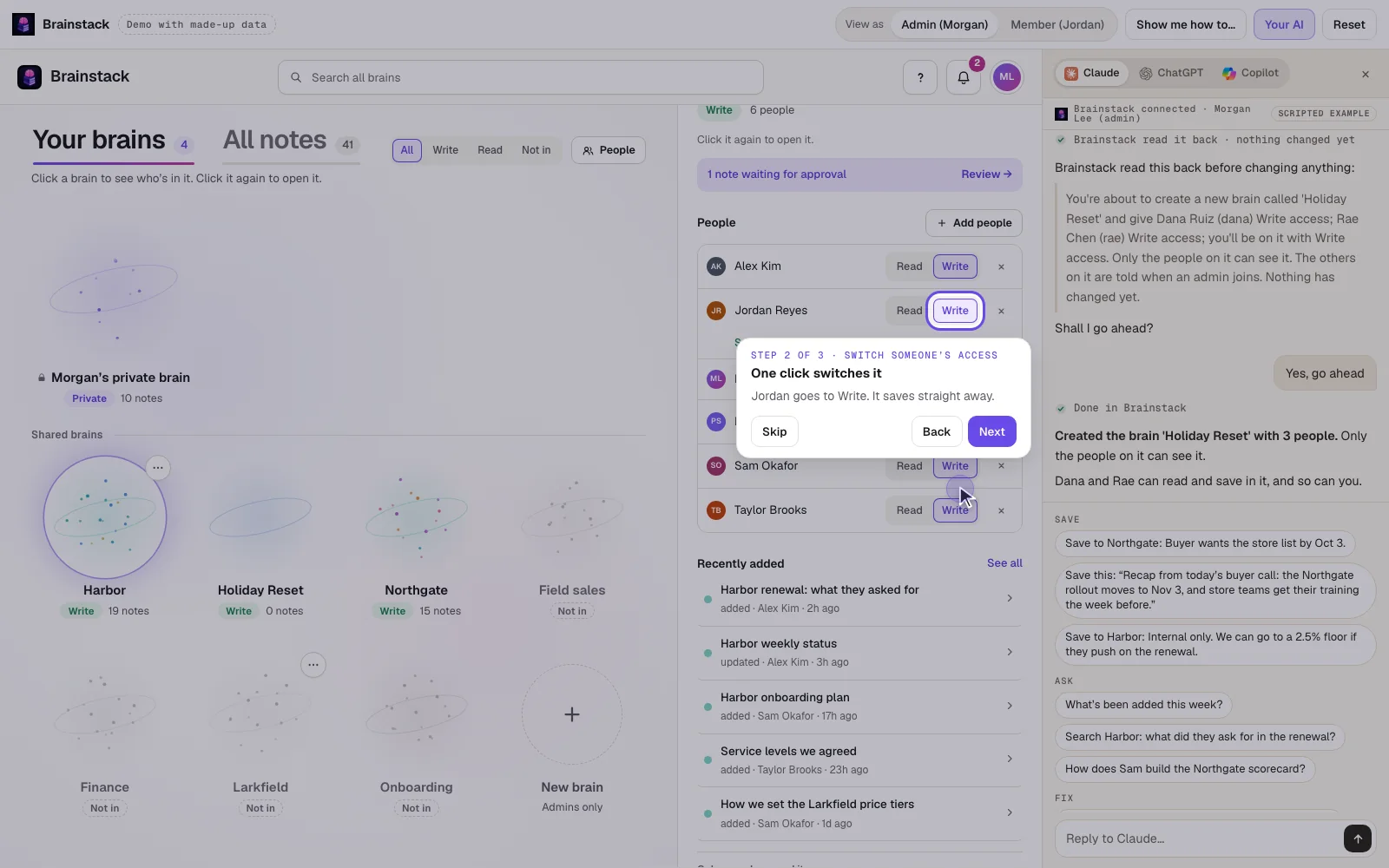
The Brainstack web app, with made-up data

Nothing to sign up for, and all the data is made up.

Open in a new tab
  • A brain for each team or client.
  • Each person has Read (search and read) or Write (also save).
  • Admins set up brains and choose who's in each one. Everyone also has a private brain. Only you can see it, admins included. You can still share a single note from it when you choose.
Brainstack demoMade-up dataOpen in a new tab

Connect your AI

Works in the AI you already use.

  • Claude
  • ChatGPT
  • Microsoft 365 Copilot
  • Claude Code
  • Any MCP app

Brainstack works inside the AI your team already uses: Claude, ChatGPT and Microsoft 365 Copilot. It's one connector, and we set it up with your team.

Where it runs

Hosted by us, or on your own server.

One product, two ways to run it. Your team sees the same Brainstack either way.

Hosted by us

  • Nothing to install.
  • Your team signs in with Google or work email.
  • We run the updates and the backups.

On your own server

  • A small server you control.
  • Your own sign-in: Google Workspace, Microsoft Entra or any OIDC provider (such as Okta).
  • Your notes are stored only on it.

Requirements, install steps, sizing and security:for your IT person

Questions

Plain answers.

Setup, sizing and backups are on the page for your IT person.

Does it record everything?
No. Brainstack only keeps what someone asks their AI to save during their work: say “save this” and it's saved. Nothing else is captured, and it doesn't read your email or files.
Who can see what I save?
Everyone in the brain you save it to, including people who join later, and anyone you share a note with directly. A note saved to your private brain stays there unless you choose to share it. After every save, your AI tells you where the note went and who can see it.
What if I save something sensitive by mistake?
Your AI checks with you first when a note looks sensitive. If something still lands in the wrong brain, you can move it to another brain, and you or an admin can delete it. A deleted note can be restored for 30 days (it comes back private).
Does the AI company see our notes, or train on them?
Your assistant sees a note while it writes it. When someone asks a question, Brainstack passes their assistant only the notes they may see. That's like pasting them into the chat, under your company's existing agreement with that AI company, and that agreement is what decides whether it may train on them. Brainstack itself runs no AI model.